The PV, FV, NPER, PMT and RATE functions act in the same manner as financial calculators
The 5 functions are all part of the same time value of money equation, so if you provide 4 of the 5 values, Excel will return the 5th
PV: Provides the present value of an investment when provided with:
The future value of the investment (FV)
A periodic payment (PMT)
Number of periods (NPER)
An interest rate (RATE)
FV: Provides the future value of an investment when provided with:
The present value of the investment (PV)
A periodic payment (PMT)
Number of periods (NPER)
An interest rate (RATE)
PMT: Provides the periodic payment of an investment when provided with:
The present value of the investment (PV)
The future value of the investment (FV)
Number of periods (NPER)
An interest rate (RATE)
NPER: Provides the number of periods of an investment when provided with:
The present value of the investment (PV)
The future value of the investment (FV)
A periodic payment (PMT)
An interest rate (RATE)
RATE: Returns the interest rate of an investment when provided with:
The present value of the investment (PV)
The future value of the investment (FV)
A periodic payment (PMT)
Number of periods (NPER)
Example
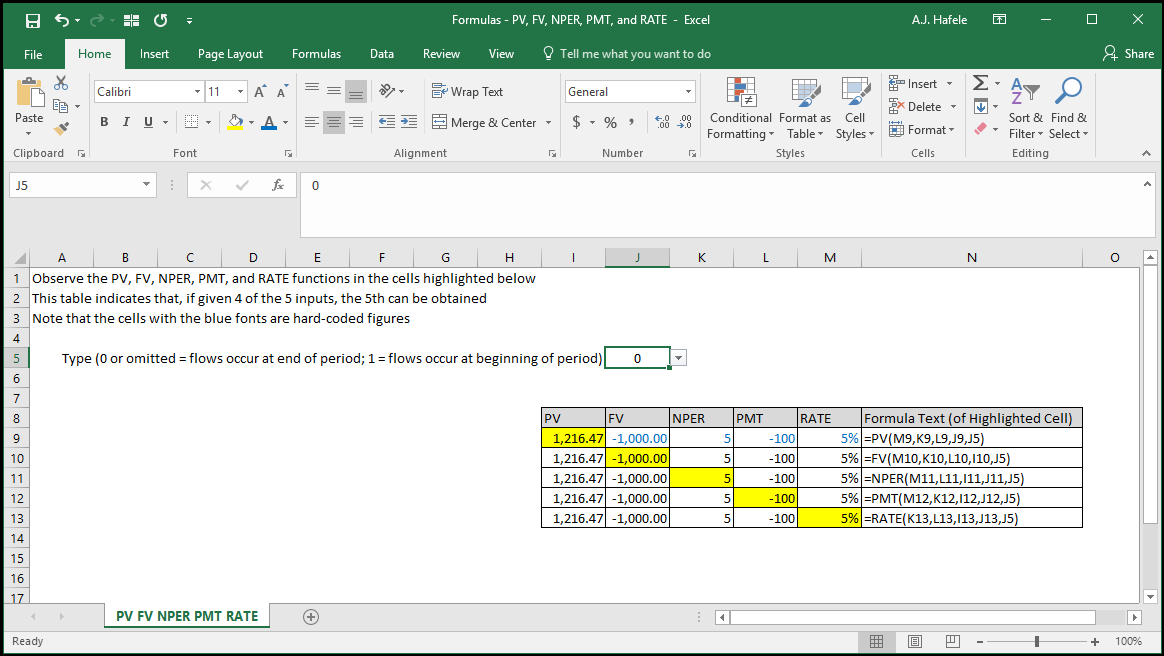
In the following screenshot, observe that the results of each function are the same when given 4 of the 5 possible inputs:
To briefly explain this investment, imagine getting a loan for $1,216.47 (PV) at an annual rate of 5% (RATE) with $100 annual payments (PMT) at the end of each year, for 5 years (NPER). If this were the situation, you would also owe $1,000 at the end of the 5 year period (FV)
Note that negative signs indicate cash outflows, and positive signs indicate cash inflows
Syntax
=PV(rate, nper, pmt, fv, type)
=FV(rate, nper, pmt, pv, type)
=NPER(rate, pmt, pv, fv, type)
=PMT(rate, nper, pv, fv, type)
=RATE(nper, pmt, pv, fv, type, guess)
Arguments
pv
The present value of an investment
This can be a hard-coded number, cell reference, or calculation
"pv" refers to "present value"
fv
The future value of an investment
This can be a hard-coded number, cell reference, or calculation
"fv" refers to "future value"
nper
The number of periods of an investment
This can be a hard-coded number, cell reference, or calculation
"nper" refers to "number of periods"
pmt
The periodic payment of an investment
This can be a hard-coded number, cell reference, or calculation
"pmt" refers to (periodic) "payment"
If the nper value represents years (months), the pmt should be an annual (a monthly) rate
rate
The interest rate of an investment
This can be a hard-coded number, cell reference, or calculation
type (optional)
0 or omitted = use when the investment cash flows are at the end of each period (i.e. for annuities)
1 = use when the investment cash flows are at the beginning of each period (i.e. for annuities due)
guess [optional; used in the RATE function only]
This is simply your guess for what the rate will be