IFERROR
Purpose
- Allows you to override a formula error with a user-defined value
- But if there is no error, the formula result will be returned
- Formula errors that are overridden include the following:
- #N/A
- #VALUE!
- #REF!
- #DIV/0!
- #NUM!
- #NAME?
- #NULL!
Example
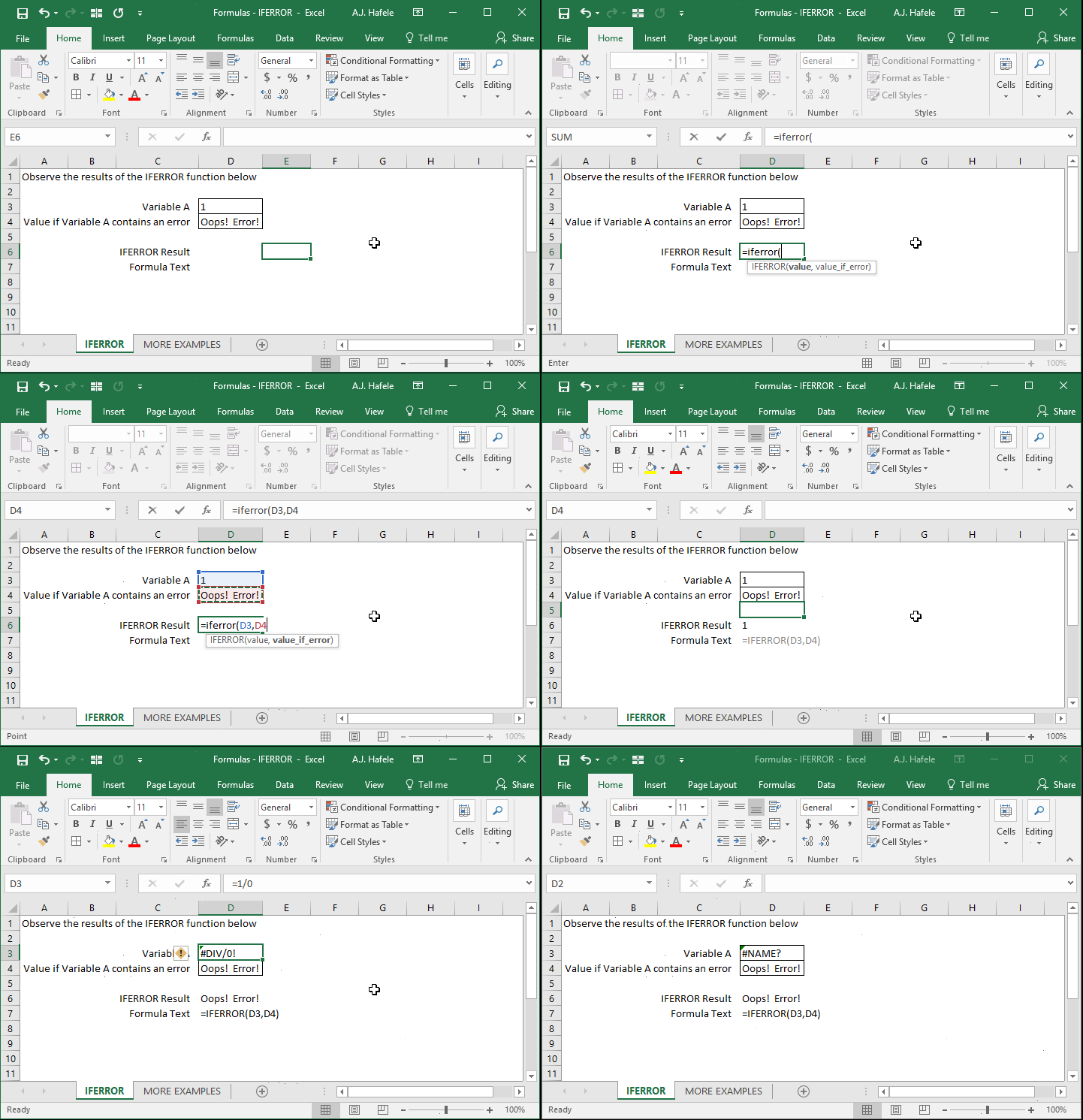
- Notice that:
- If there is no error in the 1st argument, IFERROR returns whatever the resulting value is (such as the number 1 in the above example)
- If an error exists, a user-defined value (e.g. "Error!") is returned
Syntax
=IFERROR(value, value_if_error)
Arguments
- value
- This is a formula which may (or may not) return an error
- value_if_error
- This is the value that will be returned, but only if the value returns an error
- If the value does not result in an error, the value itself will be returned
- This can be a hard-coded number, cell reference, or calculation
Tips
- It can be helpful to wrap formulas in an IFERROR function, if necessary and appropriate
- This can ensure that no ugly errors are returned in your data
Practice
External Links
