IFS
Purpose
- A new, easier alternative to using nested IF functions
- Starts by evaluating a logical test (test #1)
- If test #1 result is TRUE, a user-defined value is returned
- If test #1 result is FALSE, a 2nd logical test is evaluated
- If test #2 result is TRUE, another user-defined response is returned
- If test #2 result is FALSE, a 3rd logical test is evaluated
- Etc.
- If no test result is TRUE, an error occurs
- 127 different logical tests can be performed within a single IFS function
- This function is equivalent to using multiple IF functions in a single formula
Example
- Let's first construct an IFS statement in the following example:
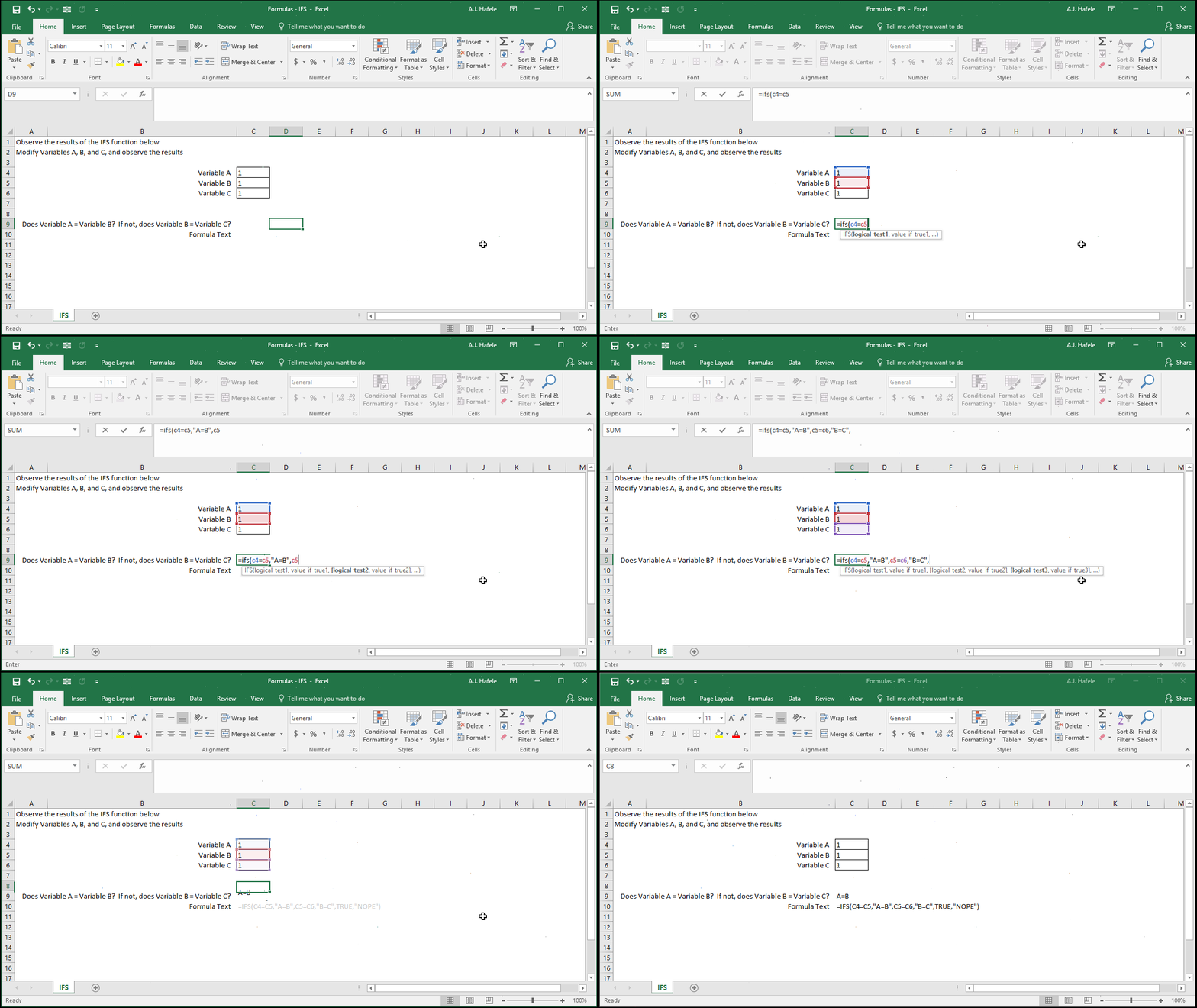
- Notice that the third (and last) logical test is simply "TRUE" - why?
- This is a final catch-all test, in the event that none of the previous tests result in TRUE
- Since TRUE is always equal to TRUE, the last user-defined value ("NOPE") will be presented only when all other tests are FALSE
- In brief, think of the last two arguments together as the same as the "Value if False" argument in the IF function
- Now let's manipulate the inputs:
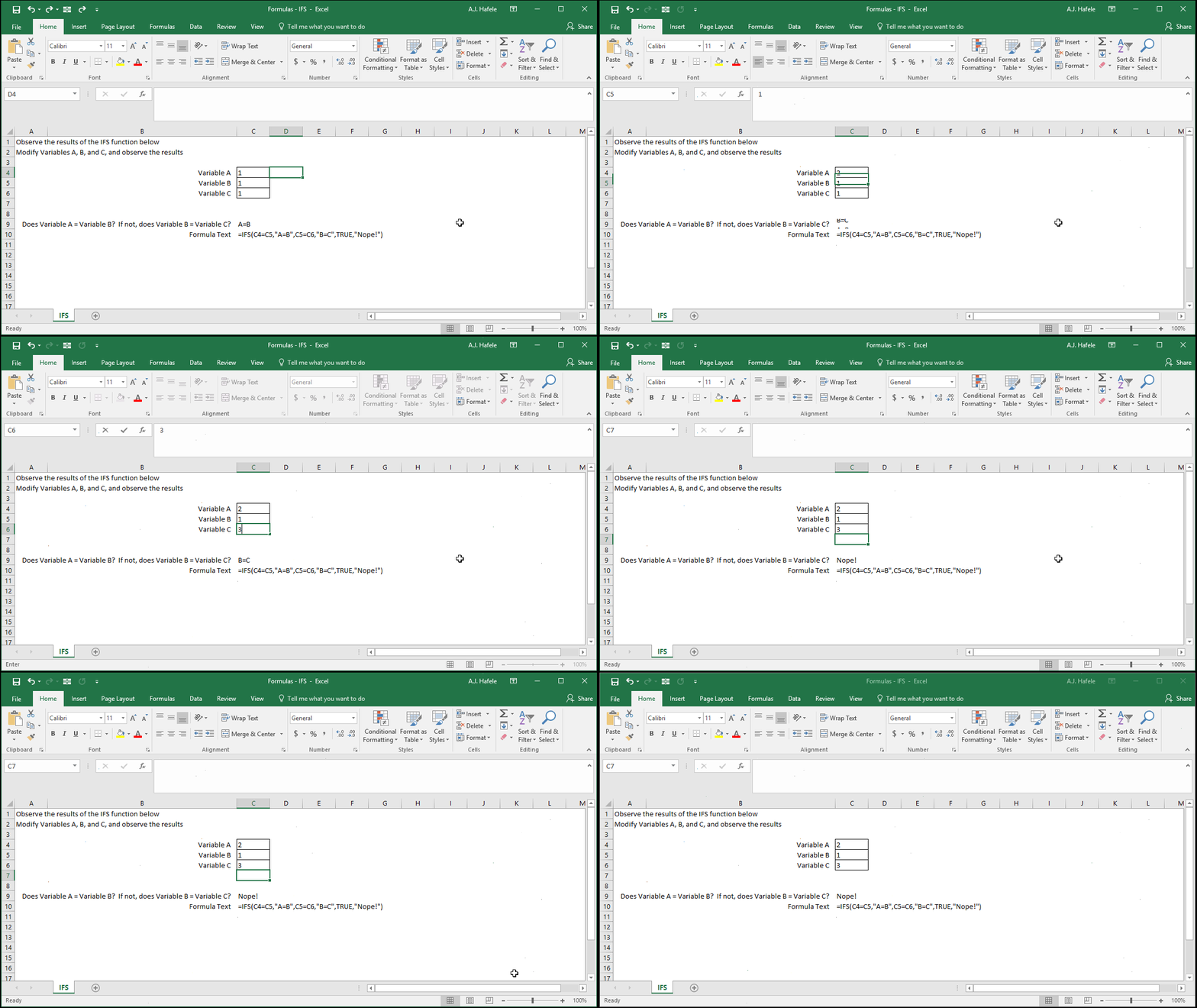
- Importantly, note that the chronology of the logical tests is important here
- For example, A, B and C can all equal one another, but "A=B" will be returned since the first logical test is TRUE
Syntax
=IFS(logical_test1, value_if_true1, logical_test2, value_if_true2, etc.)
Arguments
- logical_test1
- This is the 1st equation or inequality you are testing, the result of which can either be TRUE or FALSE
- Examples:
- 1+1=2 (this test result will always be TRUE)
- "A"<>"B" (this test result will always be TRUE)
- A1>=B1 (this test will may be TRUE or FALSE depending on the values in cells A1 and B1)
- value_if_true1
- This is a user-specified value that is returned if logical_test1 is TRUE
- This can be a hard-coded number, cell reference, or calculation
- logical_test2
- This is the 2nd equation or inequality you are testing, the result of which can either be TRUE or FALSE
- This test will only be performed if logical_test1 is FALSE
- This argument has the same properties as logical_test1
- value_if_true2
- This is a user-specified value that is returned if logical_test2 is TRUE
- This argument has the same properties as value_if_true1
- The pattern continues for up to 127 logical tests
- All future logical_test arguments have the same properties as the logical_test1 argument
- All future value_if_true arguments have the same properties as the value_if_true1 argument
Value if FALSE
- To reiterate, unlike the IF function, the IFS function has no value_if_false argument
- Nevertheless, you can easily create one by doing the following:
- In the last logical_test argument, simply type "TRUE"
- The final value_if_true argument (i.e. the very last IFS argument) should be the catch-all value (i.e. the Value if all other tests are FALSE)
- See the Example section above for an illustration of how this works
Tips
- As discussed in the Tips section of the IF function lecture, be sure to map out the logic behind formulas requiring many contingencies
Practice
External Links
