HYPERLINK
Purpose
- Creates a clickable hyperlink to another cell or range in the current workbook, another file or network location, or website
Examples
- Observe the below screenshot which uses HYPERLINK to link to cells and ranges within the workbook, as well as external websites:
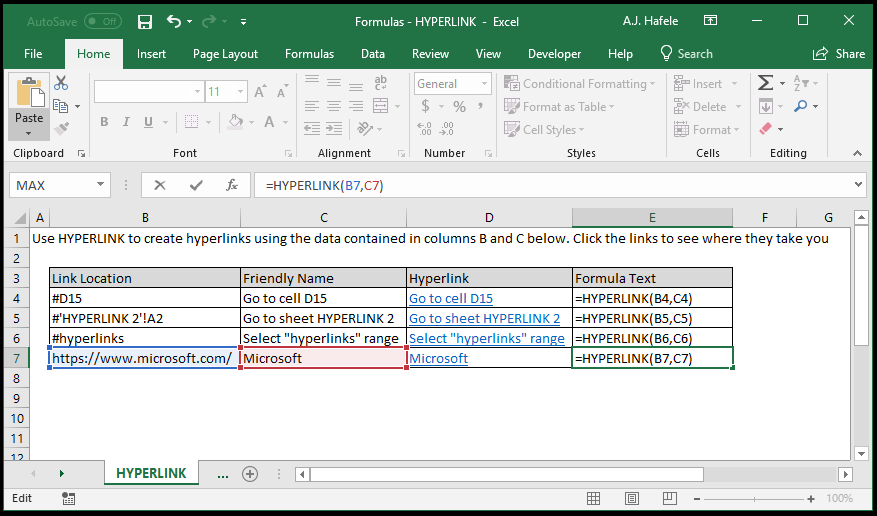
- Notice that:
- A pound sign (#) is placed before all references (in column B) to cells and ranges (including named ranges) within the workbook
- To link to cell A2 in the HYPERLINK 2 tab, the sheet name was wrapped in apostrophes, and an exclamation (!) preceded the cell reference
- Apostrophes are not necessary if sheet names contain no spaces (for example, if the sheet name were HYPERLINK3)
- The full website URL (to Microsoft) is used, including the "https://" protocol at the beginning
- The hyperlink will not work without this protocol!
- It is also worth noting that HYPERLINK can reference non-Excel files. Refer to the link below for more examples
Syntax
=HYPERLINK(link_location, friendly_name)
Arguments
- link_location
- This is the link to another cell or range in the workbook, a file or network location, or a website
- This can be hard-coded text, a cell reference, or text resulting from a calculation
- friendly_name [optional]
- This is the text of the clickable hyperlink (e.g. "click here")
- If omitted, the link_location will be the clickable link displayed
- This can be hard-coded text, a cell reference, or text resulting from a calculation
Practice
External Links
